From Manual Excel to Telegram Automation
We’ve all been there: you open your monthly utility bill, look at the total, and think, “Wait, did I really use that much electricity this month?” For a long time, managing energy bills in Singapore felt like trying to hit a moving target. But recently, I decided enough was enough. I built a seamless automation workflow that tracks my meter readings and calculates my exact costs daily — all through a simple Telegram message.
Here is the story of why I built it, how it works, and how it saved my sanity (and my spreadsheets).
The Problem: The Flaw in “Estimated” Billing
In the past, SP Group (Singapore Power) sent technicians to read meters manually once a month. The catch? They would show up anytime between the 6th and the 8th of the month.
Because the reading date wasn’t fixed, the number of days in a billing cycle constantly shifted. This lack of consistency meant my monthly bill rarely reflected my actual calendar-month usage.
To take control, I started taking photos of my meter and emailing them to SP, while manually logging my numbers into a daily Excel spreadsheet. It worked, but it was tedious.
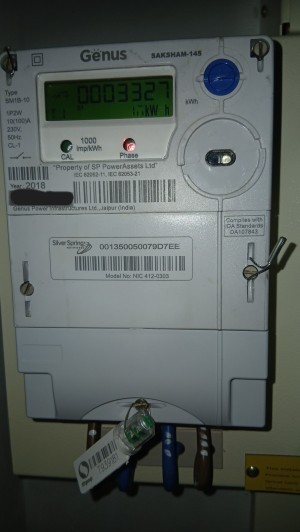
The Spark of Inspiration
Last year, SP introduced a feature in their app allowing users to submit meter photos directly. That was my lightbulb moment. I realized: “If an app can do this with a photo, I can automate this entire process myself.”
The Solution: My Telegram-to-Google-Sheets Workflow

I wanted a system where I didn’t have to type numbers into a spreadsheet or open a clunky app every day. I wanted it to be as simple as snap, send, and forget.
1. The Trigger (Telegram)
Every day, I take a quick photo of my physical meter and send it to a dedicated Telegram chat. No typing, no logging in.
2. The Brains (Data Extraction)
The photo triggers an automated backend workflow. The system uses AI-powered image recognition to look at the image, identify the meter, and extract the exact numerical reading.
3. The Math (Google Sheets Integration)
This is where the magic happens. I maintain a Google Sheet with two crucial components:
- The Log Sheet: Where the daily meter readings are appended.
- The Contract Sheet: A separate worksheet where I keep track of my current electricity contract fee (the exact rate charged per kWh).
The workflow automatically pulls my current kWh rate, calculates the exact cost of my usage since the last reading, and appends the new data as a neat row in my Google Sheet.
What household chore or utility do you wish you could automate? Let me know in the comments below!